Intelligence

AI-Powered Analysis

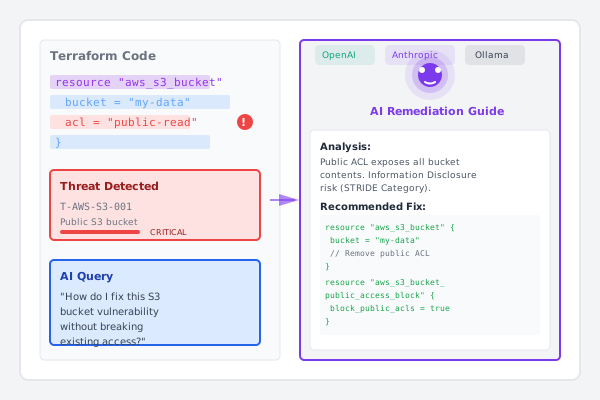
Optional LLM integration for context-aware remediation recommendations. Works with both IaC and source code scanning.

Context-Aware Remediation

Get infrastructure and code-specific fix recommendations that understand your configuration, cloud provider, and programming language.

Multiple LLM Providers

Choose from OpenAI GPT-4o, Anthropic Claude Sonnet, or run locally with Ollama. Bring your own API keys.

Interactive Queries

Ask natural language questions about threats in IaC or source code. Get detailed explanations and step-by-step remediation guides.

Risk Scoring

AI-enhanced severity assessment based on your infrastructure context, code patterns, and potential business impact.

Intelligent Security Guidance

ThreatMitigator’s AI integration is completely optional but provides powerful capabilities when enabled. Unlike rule-based detection which runs locally without any external dependencies, AI features connect to your chosen LLM provider using your own API keys.

AI analysis works seamlessly with both Infrastructure as Code scanning and source code connectivity scanning, providing intelligent remediation guidance tailored to your specific threats—whether they’re in Terraform configurations or application code.

Supported LLM Providers

OpenAI

  • GPT-4o - Latest and most capable model
  • GPT-4 Turbo - Fast and cost-effective
  • GPT-3.5 Turbo - Budget-friendly option
1
2
export OPENAI_API_KEY="sk-..."
threatmitigator query T-001 "How do I fix this?"

Anthropic Claude

  • Claude Sonnet 4 - Balanced performance and cost
  • Claude Opus 4 - Most capable reasoning
  • Claude Haiku - Fastest responses
1
2
export ANTHROPIC_API_KEY="sk-ant-..."
threatmitigator query T-001 --provider anthropic

Ollama (Local)

  • LLaMA 3 - Open-source foundation model
  • Mistral - Efficient local inference
  • CodeLlama - Optimized for code analysis
  • Custom models - Bring your own fine-tuned models
1
2
export OLLAMA_HOST="http://localhost:11434"
threatmitigator query T-001 --provider ollama --model llama3

AI Capabilities

Remediation Recommendations

Get detailed, step-by-step instructions for fixing detected threats:

 1
 2
 3
 4
 5
 6
 7
 8
 9
10
11
12
13
14
15
16
17
18
19
$ threatmitigator query T-S3-001 "How do I fix this bucket?"

Analysis: This S3 bucket allows public read access, creating an
Information Disclosure threat.

Recommended Fix:
1. Remove public ACL permissions
2. Enable S3 Block Public Access
3. Update bucket policy to restrict access

Terraform Changes:
resource "aws_s3_bucket_public_access_block" "secure" {
  bucket = aws_s3_bucket.example.id

  block_public_acls       = true
  block_public_policy     = true
  ignore_public_acls      = true
  restrict_public_buckets = true
}

Get intelligent remediation for source code connections too:

 1
 2
 3
 4
 5
 6
 7
 8
 9
10
11
12
13
14
15
16
17
18
19
20
21
22
23
24
$ threatmitigator query C-HTTP-002 "How should I secure this API call?"

Analysis: Unencrypted HTTP connection to internal service detected
in src/api/client.py:45. This creates a Tampering threat allowing
man-in-the-middle attacks.

Recommended Fix:
1. Switch to HTTPS for all internal service communication
2. Use TLS mutual authentication (mTLS) for service-to-service calls
3. Implement certificate validation

Python Code Changes:
# Before (vulnerable):
response = requests.get('http://internal-service:8080/api/users')

# After (secure):
import requests
from requests.adapters import HTTPAdapter
from urllib3.util.ssl_ import create_urllib3_context

session = requests.Session()
session.verify = '/path/to/ca-bundle.crt'  # Verify server cert
session.cert = ('/path/to/client-cert.pem', '/path/to/client-key.pem')  # mTLS
response = session.get('https://internal-service:8443/api/users')

Context-Aware Analysis

The AI understands your specific infrastructure and code configuration:

  • Resource relationships and dependencies
  • Cloud provider-specific best practices
  • Programming language idioms and frameworks
  • Database connection security patterns
  • API authentication best practices
  • Impact of changes on existing resources
  • Compliance requirements and standards

Interactive Exploration

Ask follow-up questions to understand threats better:

1
2
3
threatmitigator query T-001 "Why is this a risk?"
threatmitigator query T-001 "What's the potential impact?"
threatmitigator query T-001 "Show me alternative solutions"

Privacy and Control

Your Data, Your Choice

  • Bring your own API keys - You control the LLM provider
  • No ThreatMitigator servers involved - Direct connection to your chosen provider
  • Explicit opt-in - AI features disabled by default
  • Local-first core - All rule-based detection runs offline

What Gets Sent

When you use AI features, ThreatMitigator sends:

  • The specific threat details you’re querying
  • Relevant infrastructure configuration context
  • Your question or prompt

What never gets sent:

  • Your entire infrastructure configuration
  • Secrets or sensitive credentials (automatically redacted)
  • Any data when AI features are disabled

Configuration

Configure your preferred LLM provider in .threatmitigator.toml:

 1
 2
 3
 4
 5
 6
 7
 8
 9
10
[llm]
provider = "anthropic"  # or "openai" or "ollama"
model = "claude-sonnet-4-20250514"
temperature = 0.3
max_tokens = 2048

# Ollama-specific settings
[llm.ollama]
host = "http://localhost:11434"
timeout = 60

Cost Considerations

AI features use your own API keys, so costs vary by provider:

  • OpenAI GPT-4o: ~$0.005 per query
  • Anthropic Claude Sonnet: ~$0.003 per query
  • Ollama (local): Free, requires local GPU/CPU resources

Rule-based detection is always free and requires no external services.

ThreatMitigator’s AI integration enhances security analysis while keeping you in complete control of your data and costs.

See it in action

Enhance rule-based detection with intelligent remediation guidance from leading LLM providers.
Demo

Ready to Secure Your Infrastructure?

Join teams already using ThreatMitigator to identify security threats in their Terraform code.